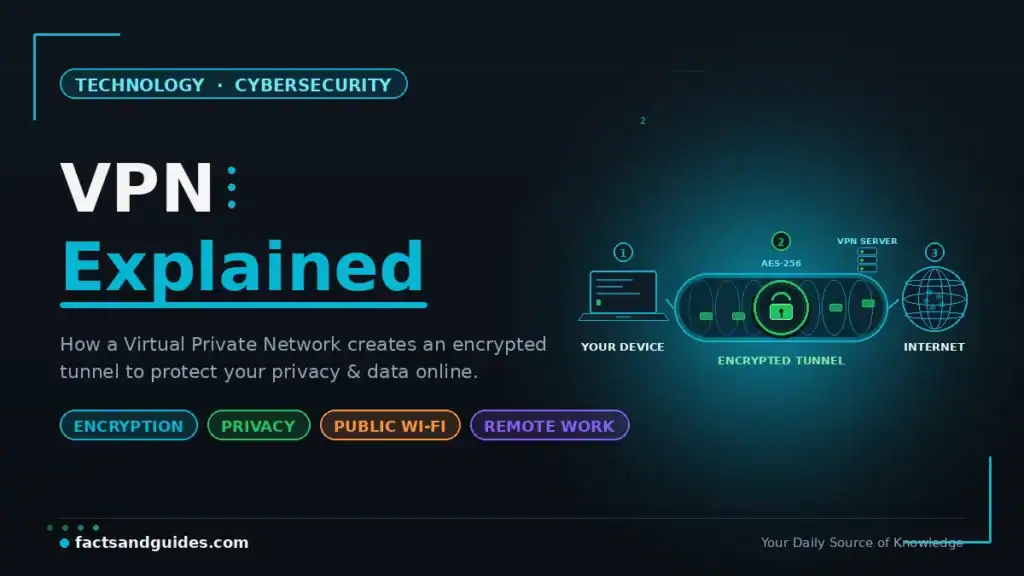
You have probably heard the term VPN a hundred times — from tech-savvy friends, YouTube ads, and “stay safe online” articles. But what does a VPN actually do? How does the encryption actually work? Is it legal in India? Do you really need one? And is a free VPN safe?
This guide is VPN explained in genuinely simple language — no networking jargon, no unnecessary complexity. Whether you are a student using public WiFi, a remote worker accessing company files, or simply someone who values online privacy, this article gives you everything you need to understand VPNs, choose the right one, and set it up on your device in minutes.
- A VPN encrypts your internet traffic so no one (ISP, hackers, governments) can see what you browse VPNs are 100% legal in India — but using them for illegal activities is still illegal Public WiFi without a VPN is like sending a postcard — anyone on the network can read your data WireGuard is the fastest modern VPN protocol; OpenVPN is the most battle-tested Free VPNs often sell your data or inject ads — if you are not paying, you are the product CERT-In (India) requires VPN providers operating Indian servers to maintain user logs for 5 years
What Is a VPN and How Does It Work? VPN Explained Simply
Understanding what is a VPN and how does it work starts with a simple analogy. Imagine you are sending a letter. Without a VPN, the letter is an open postcard — your postal service (ISP) can read it, the destination can see your home address, and anyone who intercepts it along the way can see the contents.
A VPN puts that postcard inside a locked, opaque envelope. Your ISP can see that you sent an envelope somewhere, but cannot read what is inside. The destination sees the VPN’s return address instead of yours. And anyone who intercepts the envelope finds only encrypted gibberish.
Technically, a VPN (Virtual Private Network) creates an encrypted tunnel between your device and a server operated by the VPN provider. All your internet traffic passes through this tunnel before reaching its destination. This achieves three things:
- Encryption: Your data is scrambled into unreadable code while in transit — even if intercepted, it cannot be read
- IP masking: Websites see the VPN server’s IP address instead of yours, hiding your real location
- ISP blindness: Your Internet Service Provider can see that you are connected to a VPN, but cannot see which websites you visit or what data you send
VPN Explained Step by Step: What Happens When You Connect
Here is what happens technically when you tap “Connect” on a VPN app — VPN explained in 6 steps:
- Step 1: You open your VPN app and tap “Connect.” The app initiates a connection to a VPN server (you choose the location — India, US, Singapore, etc.)
- Step 2: Your device and the VPN server perform a “handshake” — they exchange encryption keys and verify each other’s identity
- Step 3: An encrypted tunnel is established between your device and the VPN server
- Step 4: All your internet traffic — browsing, streaming, messaging, banking — now passes through this tunnel in encrypted form
- Step 5: The VPN server decrypts your traffic and forwards it to the destination website. The website sees the VPN server’s IP address, not yours
- Step 6: The website’s response travels back through the same encrypted tunnel to your device
This entire process happens in milliseconds. Modern VPN protocols add only 5–15% speed overhead — barely noticeable for browsing, and manageable for streaming.
VPN Protocols Compared: WireGuard vs OpenVPN vs IKEv2
A VPN protocol is the set of rules that determine how your data is encrypted and transmitted. Not all protocols are equal — some prioritise speed, others prioritise security.
| Protocol | Speed | Security | Best For | Status in 2026 |
|---|---|---|---|---|
| WireGuard | ⭐⭐⭐⭐⭐ Fastest | Very High (ChaCha20 encryption) | Daily use, streaming, mobile | Modern default — preferred by most providers |
| OpenVPN | ⭐⭐⭐ Moderate | Very High (AES-256 encryption) | Maximum security, corporate use | Battle-tested, widely trusted |
| IKEv2/IPSec | ⭐⭐⭐⭐ Fast | High | Mobile devices (handles network switches well) | Good for phones, built into iOS |
| PPTP | ⭐⭐⭐⭐ Fast | ❌ Broken — not secure | Nothing — avoid completely | Obsolete, do NOT use |
| L2TP/IPSec | ⭐⭐ Slow | Moderate | Legacy systems only | Outdated, being phased out |
VPN for Public WiFi Security and Other Essential Use Cases
A VPN is not just for tech enthusiasts. Here are the real-world scenarios where VPN for public WiFi security and other use cases genuinely matter.
1. Protecting Data on Public WiFi Networks
Public WiFi at cafes, airports, malls, hotels, and co-working spaces is often unencrypted or poorly secured. Without a VPN, anyone on the same network can potentially intercept your data — including passwords, banking details, emails, and personal messages. This attack (called “man-in-the-middle”) requires minimal technical skill and readily available tools. A VPN encrypts all your traffic, making intercepted data completely useless to an attacker.
2. Preventing ISP Tracking and Data Collection
Your Internet Service Provider can see every website you visit, how long you stay, and what content you access. In many countries, ISPs can legally sell this browsing data to advertisers. A VPN prevents your ISP from seeing your browsing activity, adding a genuine layer of privacy to your daily internet use.
3. Secure Remote Work
Companies worldwide require employees to connect through a VPN when accessing internal systems, databases, and documents remotely. This ensures that sensitive business data remains encrypted even when accessed from home WiFi or a coffee shop. If your company provides a corporate VPN, always use it for work-related tasks.
4. Accessing Region-Restricted Content
Some streaming platforms, websites, and services restrict content based on your geographic location. A VPN allows you to connect through a server in another country, appearing to browse from that location. This is commonly used for accessing streaming libraries, research databases, or services not available in your region.
5. Avoiding Price Discrimination
Some online services (airlines, hotels, software subscriptions) show different prices based on your location. By connecting through VPN servers in different countries, you can sometimes find lower prices for the same service.
Free vs Paid VPN: The Truth About “Free” VPNs
This is one of the most important sections in this VPN explained guide. The saying applies perfectly here: if you are not paying for the product, you ARE the product.
| Feature | Free VPN | Paid VPN (₹200–₹600/month) |
|---|---|---|
| Privacy | ❌ Many log and sell your browsing data | ✅ No-logs policy (audited) |
| Speed | Slow — overcrowded servers | Fast — dedicated infrastructure |
| Data limit | 500MB–2GB/month (barely enough for a day) | Unlimited |
| Servers | 3–5 locations | 60–100+ countries, 5,000+ servers |
| Ads/malware | ❌ Many inject ads; some contain malware | ✅ No ads, no malware |
| Protocol choice | Usually only 1 (often outdated) | WireGuard, OpenVPN, IKEv2 — your choice |
| Streaming | ❌ Blocked by most platforms | ✅ Works with Netflix, YouTube Premium, etc. |
| Customer support | None or minimal | 24/7 live chat |
The only exception: Proton VPN offers a genuinely free tier with no data limits, no ads, and a verified no-logs policy — funded by their paid users. It is the only free VPN recommended by privacy experts. However, the free tier is limited to servers in 3 countries and slower speeds.
Best VPN for India 2026: What to Look For
Choosing the best VPN for India 2026 requires considering India-specific factors — particularly the CERT-In directive and server locations.
Key Features to Prioritise
- No-logs policy (independently audited): The provider should not store records of your browsing activity. Look for audits by firms like Deloitte, PwC, or Cure53.
- WireGuard or OpenVPN protocol support: These are the only protocols you should trust in 2026.
- Kill switch: Automatically disconnects your internet if the VPN connection drops — preventing accidental unprotected browsing.
- India-optimised servers: Nearby servers (India, Singapore, UAE) provide faster speeds for Indian users.
- Multi-device support: Most paid VPNs allow 5–8 simultaneous connections — enough for your phone, laptop, tablet, and family members.
- Split tunnelling: Allows you to choose which apps use the VPN and which connect directly — useful for banking apps that block VPN connections.
| Provider | Price (₹/month) | Servers | Logs Policy | Protocol | India Servers |
|---|---|---|---|---|---|
| NordVPN | ~₹270 | 6,400+ in 111 countries | No-logs (audited by Deloitte) | NordLynx (WireGuard) | Virtual (Singapore-based) |
| ExpressVPN | ~₹550 | 3,000+ in 105 countries | No-logs (audited by PwC) | Lightway + OpenVPN | Virtual (Singapore/UK-based) |
| Surfshark | ~₹180 | 3,200+ in 100 countries | No-logs (audited by Deloitte) | WireGuard + OpenVPN | Virtual |
| Proton VPN | Free tier / ~₹350 paid | 6,500+ in 112 countries | No-logs (audited, Swiss-based) | WireGuard + OpenVPN | Virtual |
| Mullvad VPN | ~₹450 (flat) | 800+ in 43 countries | No-logs (no account needed) | WireGuard | No |
VPN Explained for India: Is It Legal? CERT-In Rules
This section is essential for any VPN explained guide written for Indian users.
Are VPNs Legal in India?
Yes, VPNs are 100% legal in India. There is no law that prohibits using a VPN. However, using a VPN to commit illegal activities (fraud, hacking, accessing banned content) is still illegal — the VPN does not provide legal immunity, only technical privacy.
The CERT-In Directive (April 2022)
In April 2022, India’s Computer Emergency Response Team (CERT-In) issued a directive requiring VPN providers operating servers in India to maintain user logs for 5 years — including names, email addresses, IP addresses, and usage patterns. In response, most major VPN providers (NordVPN, ExpressVPN, Surfshark, Proton VPN) removed their physical servers from India rather than comply. They now offer virtual Indian servers physically located outside India (typically Singapore).
For Indian users, this means:
- You can still use any VPN service freely — there is no restriction on VPN usage
- Your data is not stored on Indian servers if your VPN provider removed physical India servers
- You can still get an Indian IP address through virtual servers for accessing Indian content
How to Set Up a VPN: Step-by-Step for Android, iPhone & Laptop
Android
Open Google Play Store → search for your VPN provider (e.g., NordVPN, Surfshark) → install → open app → create account or log in → tap “Quick Connect” or choose a server location → done. Takes under 3 minutes.
iPhone / iPad
Open App Store → search for your VPN → install → open → allow VPN configuration when prompted → log in → tap Connect. iOS will show a “VPN” icon in the status bar when connected.
Windows / Mac Laptop
Visit your VPN provider’s website → download the desktop app → install → log in → choose a server → connect. Most providers also offer browser extensions for Chrome and Firefox if you only want to protect browser traffic.
5 Common VPN Myths Debunked
| Myth | Reality |
|---|---|
| “VPNs make you completely anonymous” | No. VPNs hide your IP and encrypt traffic, but websites can still track you through cookies, browser fingerprinting, and account logins. A VPN is one privacy layer, not invisibility. |
| “Only criminals use VPNs” | False. VPNs are used by businesses, journalists, remote workers, travellers, and privacy-conscious individuals worldwide. Over 1.6 billion people use VPNs globally. |
| “VPNs slow down your internet drastically” | Modern protocols like WireGuard add only 5–15% overhead. On a 100 Mbps connection, you might get 85–95 Mbps through a VPN — barely noticeable. |
| “Free VPNs are just as good as paid ones” | Most free VPNs log your data, inject ads, limit bandwidth, and some contain malware. The only recommended free option is Proton VPN’s free tier. |
| “VPNs protect you from all cyber threats” | No. VPNs do not protect against malware, phishing, weak passwords, or social engineering. They protect data in transit — not on your device. |
What a VPN Does NOT Do: VPN Explained Honestly
For a complete picture of VPN explained honestly, here is what VPNs cannot protect against:
- Malware and viruses: A VPN does not scan or block malicious files. You still need antivirus software.
- Phishing attacks: If you click a fake bank link in an email, a VPN will not save you. You still need awareness and caution.
- Weak passwords: A VPN does not protect accounts with “password123.” Use strong, unique passwords + 2FA.
- Cookies and browser fingerprinting: Websites can track you through cookies, login sessions, and browser fingerprints even with a VPN active.
- Data you voluntarily share: If you post personal information on social media or fill forms on websites, a VPN does not undo that.
A VPN is one critical layer of online security — not a complete solution. Combine it with strong passwords, two-factor authentication, updated software, and common sense. For more on securing your digital life, read our Digital Declutter Guide. And to understand the AI technology that powers modern cyber threats, check our Facts About Artificial Intelligence.